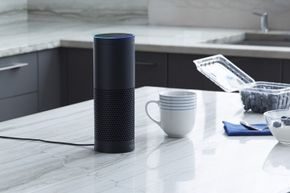
It sits on your counter looking like a cylindrical Bluetooth speaker. It has built-in omnidirectional speakers that blast music. But calling it a speaker undersells what it actually does. The Amazon Echo is a step toward those voice-controlled computers we saw in old sci-fi flicks. It is real, and it is listening.
You can ask it to play tracks, check the weather, or read your to-do list. It reads news. It handles schedules. If you have smart-home gear, you can dim lights or toggle appliances with your voice. The whole point is hands-free operation. You don’t have to drop everything to fumble with a phone screen. You don’t need to walk over to a desktop. Sure, you do need an app or website to tweak settings initially. But once it is set up? You want Beethoven while fixing your hair? You want the oven preheating and the mood lighting dimmed? The Echo handles that.
How the Echo Hardware Works
The device plugs into your home WiFi. It is always on. It is always listening for a wake word. Once it hears that trigger, it starts recording your command. That audio travels to the cloud. Specifically, it goes to the Alexa Voice Service. This is Amazon’s natural voice recognition engine. It processes the request and sends back a response. The hardware itself relies on an array of microphones. They are designed to pick up your voice from across the room. They filter out background noise and music. This is a key part of how Alexa works in a busy household.
Amazon is constantly adding services. They have opened the Alexa cloud service to third-party developers. This means new skills are being built all the time. It opens up possibilities that weren’t there at launch.
Echo Hardware
The Amazon Echo doesn’t just sit there. It listens.
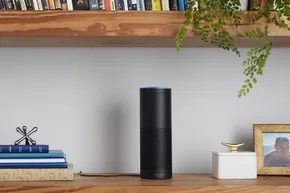
This 9.25-inch tall cylinder (8.3 centimeters wide) is a hub for cloud commands. You control it via a top-mounted ring that rotates for volume. There are buttons for muting the microphone and triggering actions, but the real work happens inside the array of seven microphones. They use beamforming and noise cancellation to isolate your voice from background chatter. That audio gets sent to the cloud for processing.
Status updates come from a light ring on the top edge. Different colors and motions tell you if Alexa is listening, streaming music, or if you’ve muted the mic. A small LED near the base shows the WiFi status. It runs on a 21-watt adapter. You can’t take this thing on the road. It’s a stationary device.
The speaker setup
Two speakers face downward into the lower half of the cylinder. A 2.5-inch woofer handles the bass. A 2-inch tweeter handles the highs. They’re wrapped in cloth with holes for sound to escape. Above them sits a reflex port in an air chamber. This design reduces distortion and makes the woofer sound deeper.
What’s inside the cylinder
Teardowns show three circuit boards powering the device.
The board at the bottom holds Texas Instruments (TI) power management ICs and speaker drivers.
The top board is circular. It’s integrated into the volume wheel. It manages the control buttons, status LEDs, and microphones.
The side board is rectangular. It sits above the speakers. This is where the processing power lives.
Key components include:
-
TI DM3725 ARM Cortex-A8 Core Digital Media Processor
-
TI power management IC
-
4 GB NAND flash memory
-
256 MB LPDDR1 RAM
-
Qualcomm Atheros QCA6234 dual-band 802.11n WiFi and Bluetooth 4.0 module
Despite that hardware, the heavy lifting isn’t local. The cloud does the real brain work.
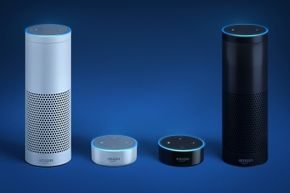
The Echo Dot
If you need something smaller, there’s the Echo Dot.
It measures 1.3 inches tall by 3.3 inches wide. It takes up less space. It costs less. The first-gen model launched in March 2016 for $89.99. The second-gen dropped in October 2016 for $49.99. That version got a faster processor.
The speaker is weaker than the full Echo. But you can bypass it. Connect external speakers via Bluetooth or the 3.5mm jack.
Want to fill your whole house with Alexa? Scatter multiple Dots. Use one for news in the kitchen, another for music in the bedroom. You don’t need a remote. An optional remote with a mic and trackpad works with both Echo and Dot models.
Here is the tricky part. If you have more than one Echo or Dot in earshot, Alexa uses a feature called Echo Spatial Perception (ESP). It figures out which device is closest to you. It responds from that one. Not all of them. Just the nearest one.
Other Technical Info
Your Amazon Echo is dead in the water without a WiFi connection. It relies on dual-band 802.11 a/b/g/n standards to stay online. This means it won’t play nice with ad-hoc or peer-to-peer networks. Public hotspots at hotels or airports often require extra login steps that Echo can’t handle. Enterprise networks are also out.
Most of the heavy lifting happens off-device. Your Echo acts as a microphone, sending voice commands over your WiFi network to the Alexa Voice Service. This is a cloud-based software running on massive servers in data centers. You’re not interacting with a local chip. You’re talking to the internet.
Alexa parses your spoken words. It interprets the intent. Then it routes the request to the right web service. The response comes back as audio. Often, you’ll also see text and graphical cards on the Alexa app home screen.
Connecting via Bluetooth and App Management
Echo is social. It connects to smartphones and tablets via Bluetooth. It supports audio streaming through the Advanced Audio Distribution Profile (A2DP). You can control playback volume and tracks using the Audio/Video Remote Control Profile (AVRCP).
Managing the device requires the Alexa app. You can download it for Amazon Fire OS 2.0+ (excluding second-gen Kindle Fire), Android 4.0+, or Apple iOS 7.0+. If you hate apps, you can use the Amazon Alexa homepage on a browser.
Setup demands either the app or the website. You must connect to WiFi. You can pair optional remotes or other devices via Bluetooth. Once live, the app lets you:
- Change settings
- Get help
- Manage shopping and to-do lists
- Control timers and alarms
- Set up news and music services
- View the music queue and current playback
Account Sharing and Learning Curves
Settings allow you to add household members. Use the voice command “switch accounts” to toggle profiles. This shares some digital content. But be careful. It also authorizes the other person to make purchases with the credit card on your account. Disable purchasing if you don’t want accidental orders.
Alexa’s voice-recognition algorithms improve with use. It learns your speech patterns. It learns your word usage. The app’s home screen displays text and graphics cards showing recent interactions. These cards include links to more details. The descriptions show what Alexa heard. They give you a chance to provide feedback on accuracy.
That feedback teaches Alexa how you speak. You can delete cards and the voice commands that invoked them. You can also delete prior commands under History in Settings. Deleting history apparently removes what Alexa has learned about your speech. Don’t clear it if you want the AI to remember you.
You can further train it through the Alexa “Voice Training” session. You read 25 commands aloud. You can also access previous commands to correct misinterpretations. This manual correction helps the system adapt.
Third-party skills expand functionality. You can activate features via voice or in the Skills section of the app. Thousands of skills are available now. Order a ride from Uber or Lyft. Play Jeopardy. Hear Twitter tweets. Follow a seven-minute workout. Get Fitbit updates. Order pizza from Dominos. Check Capital One accounts. Hear news from favorite outlets. Each listing shows the command needed to access it.
Updates download automatically. Many features reside in the cloud. Amazon and third-party developers add to them anytime.
Amazon’s Alexa Appkit allows third-party developers and manufacturers to add Alexa Voice Service to their products. It’s free to use. Capabilities have been added to the Nucleus home intercom. The Pebble Core wearable device includes Alexa. Invoxia’s Triby kitchen smart speaker has Alexa built-in.
What Amazon Echo Can Do
Once your Echo wakes up, you’re not just getting a clock. You’re tapping into a massive database. Ask for the time, weather, traffic, or sports scores. It pulls news, restaurant data from Yelp, and Wikipedia entries. The catch? You have to learn the specific commands. If you don’t know the syntax, the device just sits there.
It also pushes information to the Alexa app on your phone or tablet. Or casts it to a Fire OS tablet. The screen adds a layer of utility that audio alone can’t provide.
Streaming and Audio Control
Music is where Echo really shines. It doesn’t just play Amazon Music library tracks—digital purchases or computer imports. Prime members get access to Amazon Prime Music. Subscribers to Amazon Music Unlimited get even more. There’s a specific Echo-only tier if you want to keep costs down and restrict usage to a single device.
But it doesn’t stop at Amazon. It integrates with Pandora, iHeartRadio, Spotify, and TuneIn. You can also stream directly from your smartphone or tablet via Bluetooth.
Voice control extends to the playback itself. Pause, stop, restart. All of it. You can ask for a specific artist or genre. “Alexa, play jazz” works. You can create new Pandora stations. It’s flexible.
Audiobooks are another piece of the puzzle. Audible support is built-in. Whispersync keeps your place, so you can pick up on a different device without losing your spot. Sleep timers are available too. Set a duration, and the audio cuts off automatically. Useful if you fall asleep listening to a true-crime podcast.
Ordering and Security
You can order digital music, Amazon Choice products, or Prime-eligible items. You can also reorder previous purchases. This convenience comes with a risk. Anyone in the room can talk to Echo.
Security isn’t an afterthought, but it requires setup. You can set a confirmation code. You have to say the code to place an order. It adds a friction layer that prevents impulsive buys by guests or kids. Or you can turn off purchasing entirely via the Alexa app settings. Some users prefer the brute force method of total disablement.
Smart Home Integration
Echo isn’t just a speaker. It’s a hub. It makes compatible lights, appliances, and smart-home hubs voice-activated. The ecosystem is wide.
Brands like Insteon, Belkin WeMo, Philips Hue, ecobee, Samsung, Nest, SmartThings, and Wink are compatible. You don’t need a proprietary hub for everything. If it speaks the language, Echo can likely shout back.
IFTTT and Complex Automations
For power users, Echo connects to IFTTT (If This, Then That). You set up channels. You create triggers. This is where you move beyond simple commands into automation.
Turn on appliances when your alarm goes off. Control a Nest thermostat. Find your phone. Add tasks to an Evernote to-do list. All via voice. The possibilities expand significantly when you start chaining these triggers together. It turns the device from a passive responder into an active agent in your daily routine.
Language Support
As of early November 2016, the device understands North American English, UK English, and German. That’s it. No French. No Spanish. If you need multilingual support, you’re out of luck with this version. The focus remains on the biggest English-speaking markets and Germany.
How to Use Echo
Getting started isn’t rocket science, but it’s not entirely automatic either. You need to download the Alexa app. Connect the device to Wi-Fi. Then you start talking. The learning curve is shallow, but the command set is rigid. Master the phrasing, and the device becomes incredibly useful. Misfire, and it’s just a expensive speaker.

The device is always listening for that specific trigger. You haven’t muted the mics. If you have, it’s just plastic sitting on your counter. Otherwise, the Echo is ready to work. The default wake word is “Alexa,” but you can switch it to “Amazon” or “Echo” if you’re tired of the brand name popping up in your sentences. Future updates promise even more wake commands, though those are still on the horizon. When the ring turns blue, specifically with that cyan slice pointing toward you, it’s listening. It’s sending your voice to the cloud. It’s thinking.
It doesn’t get everything right. Echo understands a fixed set of pre-programmed commands. Say the wake word first. Then speak your intent. The result is one of three outcomes: it does the thing, it asks for clarification, or it admits it failed.
How to trigger Echo without a wake word
You don’t always need the wake word. There’s a physical action button at the top of the device. Press it. The ring lights up. Now speak. You can also use the talk button in the Alexa app or on a compatible remote control. If you’re in another room, speak into the remote. The Echo in the living room will hear you. It’s not magic. It’s just audio routing.
The physical button has a practical use case beyond voice control. Want to silence an alarm? Press the button. No need to find your phone or shout a command to an unhelpful AI. You can also customize the feedback. The app or website lets you toggle sounds for waking up and for when it stops processing. Some people like the chime. Some hate it. Your preference.
Understanding the microphone status lights
Privacy matters. If you want to be sure it’s not listening, hit the microphone button on top of the unit. The ring turns solid red. That’s the universal sign for “deaf.” The device won’t hunt for wake words. It won’t process voice commands through the air. But it’s not dead. You can still use the remote control if you have one.
Press the mic button on the remote. Speak. The Echo’s ring turns blue. It’s transmitting. When you’re done, it goes back to red. It’s a simple visual feedback loop. Hard to misunderstand.
Common Echo voice commands and examples
You can ask it about the weather. You can ask for jokes. Here are some standard queries:
- “Alexa, what’s the weather in Atlanta, Georgia?”
- “Alexa, tell me a joke.”
- “Alexa, how far is it from here to Austin, Texas?”
- “Alexa, sample songs by Elvis Costello.”
- “Alexa, what is the IMDb rating for ‘Star Wars: The Force Awakens’?”
The range is wide. But it’s not infinite. The AI has boundaries.
Echo Easter eggs and command variations
The device has hidden features. Call them Easter eggs if you want. Say the line from The Princess Bride : “Alexa, inconceivable!” It replies: “You keep using that word. I do not think that word means what you think it means.” It’s a reference. It’s clever. It’s also a distraction from the fact that it couldn’t tell you who won the Super Bowl last year.
Language is flexible. You can say things multiple ways to get the same result. If you want to listen to A Christmas Carol, try these:
- “Alexa, read ‘A Christmas Carol.'”
- “Alexa, play the book ‘A Christmas Carol.'”
- “Alexa, play the audiobook ‘A Christmas Carol.'”
- “Alexa, play ‘A Christmas Carol’ from Audible.”
It should work. It usually does. Sometimes the context matters. If you just say “play Star Wars,” it might give you music. Or movies. Or both. Context is messy.
Check the Amazon Echo help pages. The Alexa app has more details. There are thousands of skills. Some work. Some don’t. Good luck.
Pros and Cons of Amazon Echo

Amazon Echo arrived quietly for Prime members in late 2014. It hit general shelves in June 2015. The base unit costs $179.99. You can grab the optional remote for another $29.99 if you prefer physical buttons over voice commands.
Amazon isn’t resting. They’re pushing new capabilities into Echo and Alexa constantly. We’re talking movie showtimes, text-to-speech for Kindle books, and local Yelp searches. The company opened the Alexa service to third-party developers. That free access sparked a wave of voice-based services. We’re just seeing the beginning. More skills will land on Echo and other devices soon.
The reception has been solid. Critics note something important: Echo understands natural speech better than many rivals. It beats out Siri and Xbox controls. It handles distance and background noise with surprising grace. The replies are usually useful. The sound quality for music playback is decent, too. It doesn’t sound like it’s trying to be a Bose speaker. It’s functional.
The Privacy Trade-off
Every service that collects data carries risk. Alexa stores vocal recordings in the cloud. Breaches are possible. The data isn’t anonymous. Alexa needs to link to your Amazon account to remain useful. It’s a trade-off. You give up some privacy for convenience.
The device also requires your location. You need that for local weather and traffic updates. It works like your smartphone. Before you buy, you have to weigh the risk. Are you more worried about how Amazon uses your info? Or are you more wowed by the convenience? It’s the same question you ask with any data-gathering device.
Echo gives you some control. You can turn off the microphone array. The status lights show you when it’s sending your voice to the cloud. You can see exactly when it’s listening.
Hands-Free Freedom
We’ve seen voice assistants before. But Echo is different. It’s untethered from your computer or phone. It’s a hands-free step toward the integrated virtual home assistants we’ve expected for years.
This feels like the start of something bigger. Soon, we might issue voice commands for everything. From waking up to going to bed. Adjusting the thermostat. Figuring out dinner. It’s a small step toward a Star Trek -like existence.
Frequently Asked Questions
Does Amazon Echo have a monthly fee?
No monthly fee for the device itself. You might need an Amazon Prime membership for features like music streaming. But the hardware doesn’t charge you monthly.