
Mark Zuckerberg. Dustin Moskovitz. Chris Hughes. Three Harvard students who didn’t just code a website—they changed how humans connect. In 2004, they launched thefacebook.com. The goal? Simple. Put students in touch. Let them share photos. Meet new people.
It wasn’t a global phenomenon on day one. It was a Harvard campus phenomenon. A month later? Stanford, Columbia, and Yale joined the party. By 2005, the explosion was undeniable. 800 college networks across the United States. More than 5 million active users.
Then came the rebrand. August 2005. The “the” vanished. It became Facebook.
Originally exclusive to the ivory tower, the gates opened. Today, anyone can join. The demographic shifted, but the core mechanic stayed intact. Information sharing. Done in an easy, entertaining way. It sits in the same category as MySpace: a social networking site. But the execution? Different.
How to Actually Get Started
You can’t just lurk forever. You need an account. Free, obviously. But there are rules.
Facebook’s terms of use are strict on age. You must be at least 13. If you’re between 13 and 18, you must be enrolled in school. No loopholes.
Registration requires a valid email. Once you punch that in and answer the basic life questions—where do you work? Where did you go to school? Where do you live?—the engine churns. It generates your profile. Your digital ID card.
Finding People: The Three Paths
How do you find friends in a sea of millions? You have options.
First, there are networks. Facebook organizes these into four distinct buckets:
* Regions (specific cities or countries)
* Colleges
* Workplaces
* High schools
Join a network. Browse the member list. Sort by age, gender, relationship status, political views. It’s a directory. Use it.
Second, convenience. Let Facebook pull contacts from your web-based email. You hand over your email address and password. A program scans your contacts. It cross-references against Facebook’s database. If there’s a match, you get a prompt. Add that person as a friend. Done.
Third, the brute force method. Use Facebook’s search engine. Type a name. See every profile that matches. It’s not always precise. But it works.
“A poke is whatever you want it to be.”
The Infamous Poke
Let’s talk about the poke.
It gets attention. Why? Because it’s ambiguous. When you poke someone, they get a notification. You poked them. That’s it.
Is it flirting? Many members treat it as such. A digital elbow nudges. “Hey, I see you.”
According to Facebook? It means nothing. It was included as a fun, low-stakes way to interact. No strings attached. No messages required. Just a poke.
So what does that make it? A flirtation tool? A prank? A glitch in the social matrix?
In short, a poke is whatever you want it to be.
We’ve covered the origin story. The sign-up grind. The friend-finding mechanics. And the mysterious poke. Next, we’re diving into the meat of the profile itself. Apps. Mobile access. The stuff that actually keeps you logged in at 2 AM.
See the next page. We’re looking closer at Facebook Profiles.
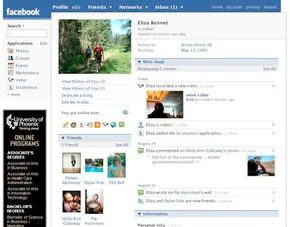
Your Facebook profile is your public face to the world. It tells people who you are and what you care about. The platform assumes you want to connect with coworkers, old classmates, and people from your hometown. It builds a dense web of contacts so you can find everyone again.
The catch is simple. If you show up, everyone else can too.
You can hide behind privacy settings. You can leave fields blank. But doing that kills the point of being there. You won’t find anyone. They won’t find you. It’s a social network. You have to show up.
An untouched profile has a standard set of parts.
- A photo upload spot.
- A friends list showing who you know.
- A personal info section. Birthdays. Jobs. Schools. Interests.
- A mini-feed. It tracks your moves. Change your picture? The feed says so. Add a friend? The feed tells everyone.
- The wall. A comment section. People leave messages here.
When you look at someone else’s page, you see the same layout. But you get buttons they don’t.
- Instant message. Opens the built-in chat.
- Send message. Like email, but inside Facebook.
- Add friend. If you aren’t connected, you send a request. They can accept it. Reject it. Or ignore it completely.
Logging in sends you to your homepage. This is the command center.
The news feed is the main event. It shows what your friends and networks are doing. Above that, you have the status update box. It lists notifications. New messages. Event invites. App recommendations. It’s also where you type what you’re doing right now.
There’s a link to invite others. You can drag people in.
Special profiles exist for businesses, artists, bands, and public figures. You don’t befriend them. You become a fan. If your company doesn’t have a page yet, talk to HR first. Most managers hate surprises. Don’t create a corporate page without clearance.
You can tweak your profile with apps. Many are built by regular users.
Dynamic Profiles
Facebook profiles use dynamic hypertext markup language (DHTML ). This isn’t just static code. It’s interactive.
You can rearrange your profile. Click a section. Drag it. Drop it somewhere else. The layout changes. You control where your information sits.
Facebook Applications

Facebook’s architecture separates its core functionality from the broader ecosystem of user-created tools. The platform distinguishes between first-party utilities built by Facebook and third-party apps developed by the community. This distinction matters because it defines how data is handled and how much control you have over your profile’s layout.
Native Platform Utilities
Facebook’s own suite of tools forms the backbone of the daily experience. These are standardized across the network.
The photos application allows unlimited uploads. A key feature here is tagging. When you tag another member, the image appears in your album and on their timeline. This creates a shared visual history but also means you’re contributing to someone else’s public record.
Video handling mimics YouTube but with stricter technical constraints. Users can upload nearly any format, though Facebook enforces a 100-megabyte file size limit and a two-minute duration cap. The platform automatically converts these files into Flash (.flv) format for streaming.
Groups allow for community building. You can join existing interest-based circles or create your own private or public hubs.
Events facilitate real-world meetups. You invite members to physical gatherings, bridging the gap between online interaction and offline presence.
The marketplace operates similarly to Craigslist. It connects buyers and sellers directly. Facebook acts as the host but does not mediate transactions. This lack of oversight means users bear full responsibility for safety and fraud prevention.
Posted items let you embed external web content. By entering a URL, the app generates a thumbnail hyperlink. Friends can click through to the source. It’s a simple way to curate interesting web pages without posting raw links.
Gifts are virtual icons designed by Susan Kare, the same designer behind the original Macintosh icons. The first gift is free. Subsequent gifts cost $1 per item. Facebook requires a credit card for these transactions and does not accept PayPal. Proceeds go to charity. You can send gifts privately or publicly with an accompanying message.
The Third-Party Application Layer
Beyond these native tools, Facebook supports a vast library of user-developed applications. Unlike other platforms that restrict Application Programming Interface (API ) access, Facebook historically allowed third-party developers to build deeply integrated experiences.
These apps can radically alter your profile. A basic page can transform into a complex dashboard featuring games, product reviews, and even virtual pets. This customization is powerful but risky.
Activating too many third-party apps creates a cluttered interface. Your profile becomes a sprawling web page that is difficult for other members to navigate. The potential for chaos is high if you don’t manage which apps have access to your data and display space.
The next step in understanding this ecosystem involves looking at how members actually build these extensions.
Third-Party Facebook Applications
Getting Started with the Developer Platform
You can’t just start coding a Facebook app out of thin air. The first step is adding the Facebook developer application to your personal profile. It’s a gatekeeping step, sure, but it’s necessary. You also need a home base for your code. Facebook doesn’t host third-party programs for you. You need your own Web server to store the application files.
The type of app you build depends on where you want it to live. You can go Web-based, desktop-based, or mobile-device-based. The key takeaway here is flexibility. You aren’t forced to embed everything deep into a user’s profile. You can create standalone programs that tap into the platform’s data without being part of the profile itself. Think of a desktop widget. It sits on your screen, linked to your news feed, but it’s not in your profile page. It just watches and reacts.
The REST Architecture Explained
Facebook’s application programming interface (API) is built on Representational State Transfer (REST ). If that sounds like academic jargon, it is. Roy Fielding coined the term in his Ph.D. dissertation at the University of California, Irvine. He was describing an idealized version of the World Wide Web. In this model, components work independently to maximize data transfer efficiency. Form follows function.
So, what does this mean for you as a developer? It means you are talking to Facebook using standard web protocols. Specifically, Hypertext Transfer Protocol (HTTP ). You send method calls using GET or POST requests.
- GET : You ask for information.
- POST : You add or change information on a Web page.
This binary choice defines the scope of what your app can do. It can retrieve data from member profiles. It can post messages to those profiles. Or it can do both, switching between reading and writing as needed.
Data Gathering via FQL
If you need to dig deeper into the database, Facebook Query Language (FQL ) is your tool. It looks and feels a lot like Structured Query Language (SQL ). Both are designed to retrieve information from databases efficiently.
With FQL, you aren’t limited to your own app’s logic. You can obtain information about any user who downloads your application. That sounds powerful. It’s also why people get nervous.
“In a way, that’s really what Facebook applications are all about — gathering information about users.”
This is the dark heart of social media apps. Developers use this data to build target audiences for advertising. They construct consumer bases for products. Critics argue that Facebook allows developers to harvest personal information and track Web surfing habits. It’s a trade-off: convenience for privacy.
Deep Integration with FBML
Want to go deeper? You need Facebook Markup Language (FBML ). It’s derived from standard HTML, but Facebook added site-specific tags. This allows developers to create applications that feel like native parts of the site.
FBML lets you change the profile appearance and function. You aren’t just a widget on the side. You’re part of the experience. This is for developers who want their app to be inseparable from the user’s daily Facebook routine.
The Canvas Page
Every application gets its own real estate on Facebook: the canvas page. You can use this space however you want.
When a user clicks your app icon, their browser navigates to this canvas. From there, the possibilities open up:
– Include Web advertising.
– Sell products using a Facebook-designed interface.
– Simply share information with the user.
It’s your storefront, your playground, or your billboard.
Funding the Dream: The fbFund
Not everyone has capital to burn. In September 2007, Facebook launched the fbFund. It was a grant program designed to encourage third-party application development.
If you haven’t received formal funding elsewhere, you could apply. The grants ranged from $25,000 to $250,000. The goal was simple: help developers build their companies on the Facebook platform. It was a way to bet on talent that might otherwise go unnoticed.
Accessing Facebook on the Go
The web isn’t the only place people hang out. The next logical step for any developer is thinking about smaller screens. How do you access Facebook through a mobile device like a cell phone? That is where the real friction and opportunity lie.

Accessing Facebook on a cell phone isn’t just about downloading an app. It’s a triad of methods: texting, uploading media, and browsing the mobile web. Each approach has distinct mechanics and limitations. Understanding them matters if you’re trying to engage with the platform without a smartphone or stable data connection.
The Mechanics of SMS and MMS
Text messaging relies on two standards: Short Message Service (SMS ) and Multimedia Messaging Service (MMS ). SMS is the classic 160-character limit. You can send texts to websites, voicemail systems, and email servers. It’s basic. It’s limited.
MMS is the upgrade. It has no strict size limit, though you need an advanced 3G network to push large files through. Not all phones support these capabilities. If your hardware is outdated, you’re stuck with basic text or nothing at all.
The routing process is surprisingly complex for something so simple. When you send a text to Facebook, it hits a mobile switching center (MSC ). The signal moves to a signal transfer point (STP ). From there, it reaches a short message service center (SMSC ). Finally, the message arrives at Facebook. The reverse happens when Facebook replies to you.
What can you do with this? You can look up basic member profiles. Send messages. Add friends. Poke people. Post on walls. Interact with some apps. It’s limited functionality, but it works offline from a data perspective.
Uploading Media via MMS
Mobile uploads mirror the SMS process but require MMS. You can send sound files, videos, and images. Because some devices don’t support MMS natively, service providers often include a feature that alerts you to a multimedia message. The alert usually provides a web link. You have to visit that link to view the content.
Uploading photos to your profile is possible this way. They appear in a special “uploaded photos” section. You can also upload notes or videos. The process is manual. Create the multimedia message first. Then, send it to the correct email address.
Browsing with Mobile Web and XHTML
You need web browsing capabilities to visit Facebook directly. Direct your phone’s browser to m.facebook.com. This site is designed specifically for mobile devices. It’s not the same as the desktop version. The code is written in Extensible HyperText Markup Language (XHTML ).
XHTML is stricter than standard HTML. Why the restriction? The World Wide Web Consortium (W3C ), an international standards body, recognized a problem. Mobile devices have far fewer resources than computers. They can’t interpret complex web pages. XHTML levels the playing field by forcing a simpler, cleaner structure that phones can easily render.
For specific uploads via the browser or email:
– Send notes to [email protected]
– Send photos or videos to [email protected]
The Rise and Fall of Facebook Credits
Before the current ecosystem, there was Facebook Credits. This was a virtual currency introduced in 2009. It allowed users to buy items in games and apps on the platform. The exchange rate was simple: one U.S. dollar bought 10 Facebook Credits.
The initial plan was ambitious. Facebook intended for Credits to eventually become the only payment method on the platform. That plan was scrapped. The initiative was removed entirely in 2013.
Facebook Facts and Figures
In the next section, we’ll look at some of Facebook’s impressive statistics.

It started as a Harvard dorm project. Now it sits in Palo Alto, with a satellite office in New York. The scale is what catches you. Over 350 employees. A benefits package that looks less like corporate policy and more like a lifestyle subscription. No premiums for health, dental, or vision. Four weeks of vacation. Eight company holidays. Every meal—breakfast, lunch, dinner—is catered. Dry cleaning on staff. And you get to pick your weapon: an IBM Thinkpad or an Apple MacBook Pro.
The growth is almost violent in its consistency. Facebook claims 57 million active members. That definition matters. You have to log on within a 30-day window to count. Since January 2007, the site has added 250,000 new registrations every single day. The user base doubles every six months. The geography is predictable. United States. Then Canada. Then the United Kingdom.
The Image-Heavy Infrastructure
It isn’t just about text. Facebook positions itself as the number one image-sharing service on the internet. It pulls more traffic than the second, third, and fourth places combined. The volume is staggering. More than 14 million images uploaded daily. There is no cap. No limit. You upload one, someone else uploads ten. The number climbs exponentially because new faces arrive every day.
This traffic creates a technical bottleneck. How do you handle millions of simultaneous requests without the site collapsing? You stop hitting the database for everything.
Facebook relies on around 200 memcached servers for production. A few more sit in development. “Memcached” is short for memory caching. It’s a method of temporarily storing data in the server’s RAM instead of digging through a hard drive. When a user requests information, the server checks the memory first. If it’s there, it delivers it instantly. If not, it fetches it, stores a copy, and sends it. This reduces latency. It speeds up the delivery of data. It keeps the site from choking.
Where the Servers Live
Custom-built servers handle the back-end operations. Monitoring systems track every heartbeat of those machines. Servers are bulky. They take up physical space. They generate heat. So Facebook doesn’t own all the real estate. It leases.
In 2007, they signed an agreement with DuPont Fabros Technology. The deal gave them 10,000 square feet in an Ashburn, Virginia, storage center. That is where the physical infrastructure lives.
The Money Question
How does this all get paid for? Web advertising brings in some cash. But it’s not the main engine. The majority of funding comes from private investors. Since launching in 2004, Facebook has pulled in more than $40 million. It’s a venture-backed machine.
For beginners trying to navigate this ecosystem, the barriers are low but the privacy is tricky. Can you join without anyone knowing? Technically yes, if you use a fake name and fake info. It’s not recommended for serious networking, but it works. To actually use it, you go to www.facebook.com, sign up, and start adding friends. Post updates. Like pages. Join groups. Message people. It’s a tool. Like any tool, its value depends on who you’re talking to.
“Memcached” stands for memory caching, a method of temporarily storing data.
The infrastructure is massive. The perks are generous. The growth is relentless. The rest is just details.