


“Can you hear me now?” The final test of connections. We associate this annoyance with poor cell phone service, but the static, hiss, echo, etc. of traditional landline phones can be just as annoying. Line noise is even more dangerous if you’re still using a dial-up connection. It doesn’t just spoil the conversation. Your internet session may be completely interrupted. Some modems are very sensitive and may give a simple beep when waiting for a call and end the browsing session.
Complaints about unpleasant sounds coming through the phone line are common. Fortunately, fixing noise on phone lines is rarely a complex technical task. You don’t need a degree in telecommunications to eliminate static. You just need to identify the source.
The reason is rarely the phone itself. Usually the wiring in the home is faulty, the cable is too long or the power cord is damaged. However, there are certain factors that can cause static noise.
Why is the line noisy?
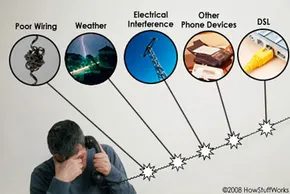
If you want to stop the hissing sound, you need to know what is causing it. Noise typically comes from one of four main areas:
- Weather : Rain or snow can leak into external connections. Even distant lightning strikes can cause voltage spikes and disrupt signals.
- Electrical Interference : Power lines, television transmitters and nearby transformers can leak electromagnetic interference into telephone lines.
- Other Devices : Fax machines, answering machines and splitters (devices that allow you to connect two phones to a single jack) are common sources of interference and noise.
- DSL service : If you share a line with a DSL (Digital Subscriber Line) connection, high-frequency data signals can interfere with voice traffic.
With a good rule of thumb, you can narrow it down quickly. If the noise is intermittent and coincides with severe weather, the cause is natural factors. If static persists, check your hardware and wiring.
Find and fix noise on your phone line
The next step is related to isolation. You need to find out if the noise is coming from inside the house or from the street. First, unplug all devices from each phone jack. This includes modems, faxes and hubs.
Connect a known working wireless phone directly to the main junction box. Typically, this is the point where the line enters your home. If the noise stops, the problem is either with the home’s wiring or the devices. If static persists, the problem is with the service provider’s wiring or outside weather conditions.
Once the source is isolated, repair is usually easy. Replace your old and broken jack. If you use a DSL connection, make sure that the splitter is suitable for the specific Internet service. If electrical interference occurs, phone lines may need to be routed away from power lines or filters installed.
This is very annoying. The call hangs up. But it can be fixed. The solution is not necessarily a new supplier. Sometimes they’re just bad wiring in the basement.

Identifying the culprit: fixed line static electricity diagnostic procedures
If you’re still staring at a dead phone or hearing a symphony of static, the weather may not be to blame. It’s time to play detective. The easiest way to identify the source of the interference is to remove it. Strip the wires to reveal it. Disconnect all other devices. If the noise persists, move the active phones away from routers, microwave ovens, or other electronic devices that generate electromagnetic energy.
Audio is the best diagnostic tool. The frequency of disturbances says it all. still? This is usually caused by a cordless phone, an outdated answering machine, or an exposed wire damaged by rainy weather. Is it a loud scream or a low hum? This is a clear sign of DSL problems. The Internet signal leaks into the audio channel.
Check your hardware
Home hardware is often the weak link. Before you blame the utility company, look at what you have.
- Number of devices. ** Do all the phones in your home have the same problem? If you only have one, your phone may be defective or the quality is too low. Older phones lack modern filtering capabilities and can become noisy transmitters themselves.
– Power cord integrity. Make sure the power cord is plugged into a wall outlet. It must be straight, intact and not more than 3.7 meters long. The long cable acts as an antenna that picks up any stray signals and corrupts the data before it reaches the phones.
– Replace the cord. ** Try different outlets in your home. Power spikes can damage certain connectors and cause noise.
-**Distance. ** Keep telephone cords at least 0.6 meters away from power cords, speaker cords and other electronic devices. Combining them creates a destructive feedback loop.
DSL multipliers and filters
Your Internet Service Provider (ISP) may be the root cause. When using DSL, voice and data are transmitted over the same pair of copper wires. Without proper isolation, high-frequency data signals can drown out conversations.
Requires a DSL line filter. Must be installed on all phones and fax machines. Filters provided by ISPs are often cheap and ineffective. A high-quality DSL phone filter can be purchased at any electronics store for about $5. Ask for recommendations. These small devices prevent high-frequency data noise from entering your phone.
If static persists, consider using a separate line noise filter or telephone noise filter. Connect directly to a headset to reduce residual noise. If you believe that a nearby radio transmitter is causing the problem, using a filter can help reduce that interference.
When to contact a professional
If you’ve tried everything and the line still crackles, contact your phone company. Most people test your line for noise. Be prepared to explain exactly how you will use the line. Let us know if you are sending audio only or both data and audio. This difference helps distinguish whether the problem is inside the house or outside the street closet.
What if the voice comes from a family member? You are alone there.
Latest noise cancellation and FAQ
Anti-interference is no longer just a copper wire. Cell phones and wireless phones are also in the fray. Newer smartphone models have echo cancellation and noise reduction technology built into their operating systems.
Hardware manufacturers such as Plantronics tout this feature when selling wireless headsets. They used digital signal processing to remove background noise from “very important” conversations. It’s an aggressive approach to marketing, but it works.
Frequently asked questions
What causes noise on a telephone line?
Electrical interference is the main reason. Transformers, power cables and television transmitters are common problems. This problem can also be caused by cabling errors, bad weather or technical faults in the main lines operated by the ISP.
How do I test my phone line for noise?
Put your phone on silent and listen. If you hear a “buzzing”, “buzzing” or “cracking” sound, the wiring is damaged. If the sound disappears after muting, the problem may be with the phone itself.
How can I resolve noise on my phone line?
First, connect your phone to another port. If the sound stops, the original connector is damaged. If the sound persists, tighten the cable connector or replace the phone cord entirely. If none of these steps help, contact your service provider to check the external connection.
Does a noisy phone line mean my phone is being tapped?
Not always. Noise can be a sign of eavesdropping, but often it’s just a distraction. However, if you hear background noise, beeps, high-pitched hums, hums, clicks, or muffled background noise during a call, it’s worth investigating. These are common signs of tapped lines.
Read more
Related Articles
– How the phone works
– How a cordless phone works
– How mobile phones work
– How cell phone jammers work
– How Google Phone works
– How GPS phones work
– How modems work
– How DSL works
– How the fax works
Useful Links
– AT&T Line Noise Help
– Verizon line noise helps
Source
– Anderson, Nate. “Your friends and neighbors still use dial-up.” Festival of the art of technology. February 27, 2006.
– brandy.com. “Processing John Kohina” (May 21, 2008)
– Federal Communications Commission. “Telephone Interference Bulletin CIB-10 August 1995.” National Radio Amateur Association. (October 2, 2008)
-iConnectTo.Net. “What causes impedance?” (May 21, 2008)
– Tennessee State University. “Line noise problem” 2006 (May 21, 2008)
– University of New South Wales. “Fact sheet 2”. 2004 (May 21, 2008)


