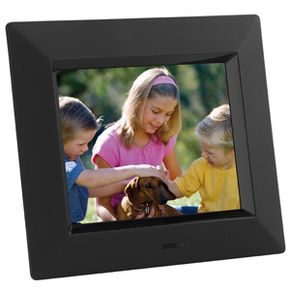
How #digitalphotoframes connect tech-free homes and memories
We all have a relative who treats a mouse like a foreign object. You can spend hours curating shared photo albums or creating social media albums, but some family members would rather stare at a blank wall than log in and browse. For these people, the cloud is a weather phenomenon, not a storage solution.
The solution is not a lecture on Wi-Fi passwords. This is a Digital Photo Frame.
The device looks like a regular frame that you’d hang on a mantle. Internally, the LCD screen scrolls through the images. The magic is in the connections. Unlike USB drives, which have to swap out, this gadget connects to the Internet (historically via a phone line, but modern equivalents use broadband) to fetch new images automatically. You don’t have to be there. They don’t have to be tech savvy. Just send the file.
Several large companies tried to dominate this niche. Polaroid, Kodak, GiiNii and Ceiva have all released hardware. The physical structure, including the bezel, screen and electronics box, is pretty much the same across all brands. differential? Connections, resolutions and processing of delivery pipes.
Focus on the Ceiva Digital Photo Receiver. This was a pioneer in proving that the concept could work for non-technical users as well. Before we discuss the hardware, let’s look at the user experience.
Ceiva and computer-free
The core value of digital photo frames is to eliminate friction. Most elderly or less tech-comfortable relatives don’t want to browse websites, download files, or manage folders. They want to see pictures.
With Ceiva, the workflow is inverted. The user does nothing. The sender uploads the image to the Ceiva portal. The frames are located on a shelf at the recipient’s home and checks in with the server periodically. When it detects new content, it downloads it and adds it to the slideshow.
This is important because it respects the recipient’s boundaries. There is no need to install software updates. There is no need to create an email account. No troubleshooting when the internet blips. It just works.
For the sender, it’s all about control. You decide what gets displayed. You can also rotate the image, set duration and embed a text message. But recipients get the passive benefit of scrolling through a gallery of family moments without the cognitive burden of interacting with a computer.
The hardware itself is unassuming. A simple plastic or wood frame houses an LCD panel. Early models used lower resolution displays, but the preference for simplicity over pixel density was clear. The devices are connected via a modem. dials up, downloads, displays. This is a closed loop. No browsing. No surprises.
Why is this model important? Because it is targeted a demographic that traditional tech ignored. It wasn’t trying to replace a PC. It was trying to replace the physical photo album.
result? A device that sits quietly in your home and updates automatically. A bridge between the digital photo gallery and the analog living room. It’s not flashy. There is no app store. But for relatives who refuse to touch the keyboard, it’s the only thing that works.
The advantage of digital photo frames is that they make sharing a background process. You send. They see. No interaction required.
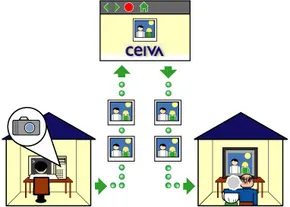
The basic premise is simple, but almost fundamental in terms of accessibility. This device is not for photographers or gadget hoarders. This is for people who don’t have a computer or digital camera and don’t know how to navigate a web browser. The goal is to get people involved in sharing digital photos without forcing them to learn the technology.
What could be the solution? It’s a relay system.
Others bought frames, including grandchildren, tech-savvy siblings and helpers. They create an account. They take care of the installation. And they gave it away. From then on, the person receiving the frame exists in the physical world, and the digital magic happens elsewhere.
How the download process actually works
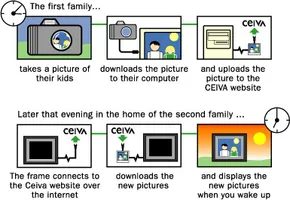
Armed with a computer and certain skills, you log in to Ceiva’s website. Upload your image from there. Although this is a manual step, it can separate the complexity.
Hard work is done all night.
The digital photo frame is at another person’s place. No Wi-Fi connection required. You don’t need an iPad or smartphone to sync. Uses a regular phone line. The framework connects to the Ceiva server every night. All new images you upload during the day will be uploaded.
When the recipient wakes up, the slideshow carousel has been updated. The new picture is there. hold on
This asynchronous approach eliminates friction. No need to be online at the same time. There is no need to push files via e-mail or USB. Uploaded to the portal. The frame brings out what you need.
远程控制相框
所有设置都位于网络界面上。 您无需触摸硬件即可改变其行为方式。 这使得物理设备变得愚蠢和简单。 智能保留在浏览器中。
您可以调整的关键设置包括:
- 电源计划 :设置相框打开和关闭的具体时间。 这可以延长屏幕寿命并减少用电量。
- 幻灯片间隔 :控制每张照片在切换前显示的时间。 五秒? 十? 二十? 你的电话。
- 拨号电话号码 :如果画面移动到不同的区号,您可以远程更新电话号码。 无需在机箱内重新配置调制解调器设置。
Internal hardware
What framework enables this?
This is a pure Linux system. The equipment is minimal. small processor. Enough RAM to run the slideshow engine. It has a built-in modem for connecting to a phone line. There is also a screen. Usually an 8- or 10-inch TFT-LCD screen, depending on the model.
I can’t see the OS interface. There is no menu. There are no buttons pressed on the front panel. Just a picture.
The frame starts. Check the internal clock. When viewing photos, get the latest catalog from the server. The screen turns off when it’s time to go to sleep.
This simplicity is the main selling point of this product. Turn complex digital photo management into a passive experience for recipients.
为什么会褪色
这项技术奏效了。 人们喜欢它。 但基础设施没有站稳脚跟。
拨号上网已经过时了。 广阔
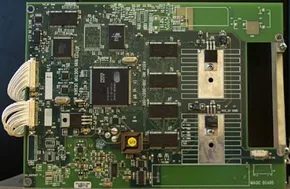
How the #Ceiva digital photo frame really works
Don’t be fooled by its stylish appearance. The frame is essentially a single-use computer. It shares the same basic DNA as a desktop tower (processor, memory, network connectivity), but it’s streamlined to require only a fraction of the power and complexity needed to get by. No need to multitask. It just needs to look at pictures.
Brain: A simple processor
At its heart is a central processing unit, just like the chip inside a handheld game console. This is not an exaggeration. The processor takes care of downloading images from Ceiva’s website. Once that download finishes, the processor barely breaks a sweat. The final episode is practically spent in hibernation, waiting for the next update.
Still fresh in my memory
Forget RAM. The device works with two permanent storage types. First, there is the ROM, which is the operating system code itself. Then there is the flash memory which contains the actual images, settings and software logic. The key here is persistence. Remove the frame? No problem. Data is not lost even if the power goes out. It remembers everything.
Connection: slow but stable modem
Connect to the Internet via a 33.6 Kbps modem. Yes, it’s pretty slow by today’s standards. However, for downloading compressed JPEG files over a phone line or basic DSL connection, this is more than enough to get the job done. It doesn’t stream video. It doesn’t load web pages. Just download the gallery.
Eyes: Passive matrix LCD
The screen is a 640 x 480 pixel passive matrix LCD. The display area is approximately 5 x 7 inches. Passive matrix technology was chosen because it allows the screen to be thin enough to fit into a standard picture frame without looking like an slab of electronics. The color depth is 12 bits, which limits the color palette to about 4,100 different colors. This is not a true color, but is generally acceptable for family photos.
用户界面:两个按钮和一个梦想
你不需要手册。 只有两个物理按钮。 一个黑色按钮控制亮度。 另一个白色按钮用于打开设备电源,并可以手动触发与服务器的连接。 就是这样。 没有触摸屏。 没有菜单。 就开、关、亮/暗。
Engine: PSOS
The frame does not work on Windows or Linux. It uses PSOS, an embedded operating system designed for PDAs, set-top boxes and test equipment. It is light, stable and ideal for devices that do only one job and does it 24/7.
创建数字画廊
那么如何将照片放到这个东西上呢? 这不是将文件拖放到文件夹中。 这是关于工作流程的。
Call to view photos instead of browsing
Start by plugging the bezel into a power outlet and a standard phone jack. The device starts up and deletes the library of images previously stored in the internal memory. If you need to reset the connection or initiate a manual update, there is a simple physical trigger by pressing and holding the white button on the back. That action forces the frame to dial out.
Entry is simple. You pay $50 a year for Ceiva. Prices include access charges for phone lines that use local numbers to bridge the gap. But let’s see what this connection actually does. This is not a World Wide Web portal. There is no browsing. No email checks. There are no interactive widgets.
The hardware is designed more like a frame than a computer.
Synchronization process
When the telephone network connection is established, the frame uses a unique serial number to communicate with Ceiva’s servers. Magic happens here, but quietly in the background. The device performs a comparison check. Examines the image currently in the frame and compares it to the queue waiting on the server.
New file? Loaded.
Old files? Ignored.
Settings updates? Applied immediately.
This process ensures that you aren’t wasting bandwidth or storage space on duplicates.
Autonomy and shutdown
下载周期完成后,the frame releases the phone line。 It goes back to what it does best:以幻灯片形式显示照片。 该硬件包括内置电源管理逻辑。 它将在用户定义的晚上时间关闭,以节省能源并降低屏幕烧屏风险。 它在设定的早晨时间醒来,准备循环处理新批次。
The Web Side
How the #Ceiva digital photo frame works: installation, features and future technology
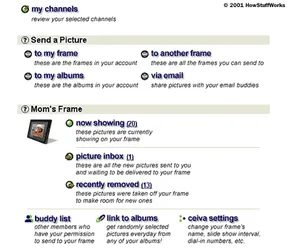
The control of the Ceiva frame is completely web-based. Buy the hardware, register on the website and pay for the service. This creates a unique account that is strictly tied to your device. When you’re done, you can upload photos and adjust display settings.
The real magic happens when you hand the frame for people who hate technology. Just plug it into an outlet and a phone line. Then press the white button on the back. that’s it. There are no computers. There are no drivers.
When you frame first powers on for the first time, it will make a free call and download your custom settings from Ceiva’s servers. One of these settings is the local number. Once the frame is configured, it uses the local line to connect to the Internet and download the uploaded images. It’s a smart, low-tech solution to a high-tech problem.
Once you have registered your photo frame, you will be able to access My Home. This dashboard allows you to manage all frames linked to your account.
Control your digital photo frame remotely
Ceiva’s website is more than just a portal. This is the command center. You can perform several specific functions through My Home.
- Create Channel : Ceiva collaborates with content creators to deliver daily images. For example, The Weather Channel broadcasts local three-day weather forecasts. The frame automatically updates this information every time you call.
- Send a photo : You can send a photo to a registered photo frame or a photo frame that someone else has shared with you. This website includes an online photo album that can store up to 1000 photos. You can set a frame to shuffle your albums. You can also email these images to anyone with an email account. You can add borders and text and adjust the display settings during transmission.
- Check Status : See exactly which photo is currently on your screen. You can also see which images are in the download queue and which images have been removed.
- Adjust settings : Control frame name, slideshow interval, power on/off time, local number.
What Comes Next for Digital Frames
拨号时代即将结束。 当电话线消失时会发生什么?
未来的框架可能会完全放弃调制解调器。 Wi-Fi 和蜂窝数据将取代“插入电话线”步骤。 网络界面可能会从拨号同步工具转变为实时流媒体仪表板。 期待更高分辨率的屏幕、更好的照片压缩,甚至可能是社交媒体集成。
核心思想保持不变:让它变得如此简单,祖父母可以使用它而无需寻求帮助。 该技术变得更安静、更快,并且更少依赖铜线。
多久我们就会忘记拨号音听起来是什么样的?
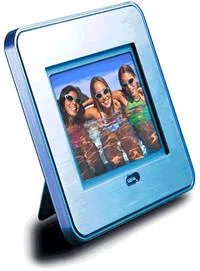
The upcoming Ceiva digital photo frame is more than just a software update. Hardware upgrades change the way you interact with your photos. The biggest new feature is the print function. Now you can send your images to your local printer for immediate printing or use a remote service to mail a physical copy directly to your home. This bridges the gap between digital display and tangible memories that many users have been hoping for for years.
Physical media and audio integration
Hardware changes are just as important as new printing options. A CompactFlash memory slot has been added to the frame. This means you can bypass the web entirely for a moment and load pictures directly from your digital camera. No computer needed. No Wi-Fi needed. Just insert the card and watch the slide show.
Audio is also entering the mix. You can now attach recorded audio to it. Think voice memos, birthday greetings, or ambient noise. It adds context that still images never had. The frame comes with a small remote control that you can use to handle tasks such as printing and adjusting settings. Previously, certain configurations were locked behind the web interface. You can now make adjustments without opening the browser.
Web controls remain central
Despite the new buttons and slots, the web interface remains the central control point. This is intentional. The goal is to make the device simple enough for non-tech-savvy users. Grandparents don’t have to learn how to navigate menus. They’ll just see photos. The complexity is hidden in the backend. You manage the content online. they enjoy the display. This is a design choice that favors ease of use over feature bloat.