Monday at WWDC 2026 Apple didn’t talk about AI first. Or iOS. Craig Federighi slapped a name on MacOS. MacOS 27 Golden Gate he called it. A VW bus drove by for context. I thought Haight-Ashbury first. The summer of love vibes. But yeah if you drive from Marin you hit the bridge. Makes sense.
CNET guessed Redwood. Or Shasta. Mammoth even. Wrong again. Golden Gate was a curveball. Nobody saw it coming.
Under the glass
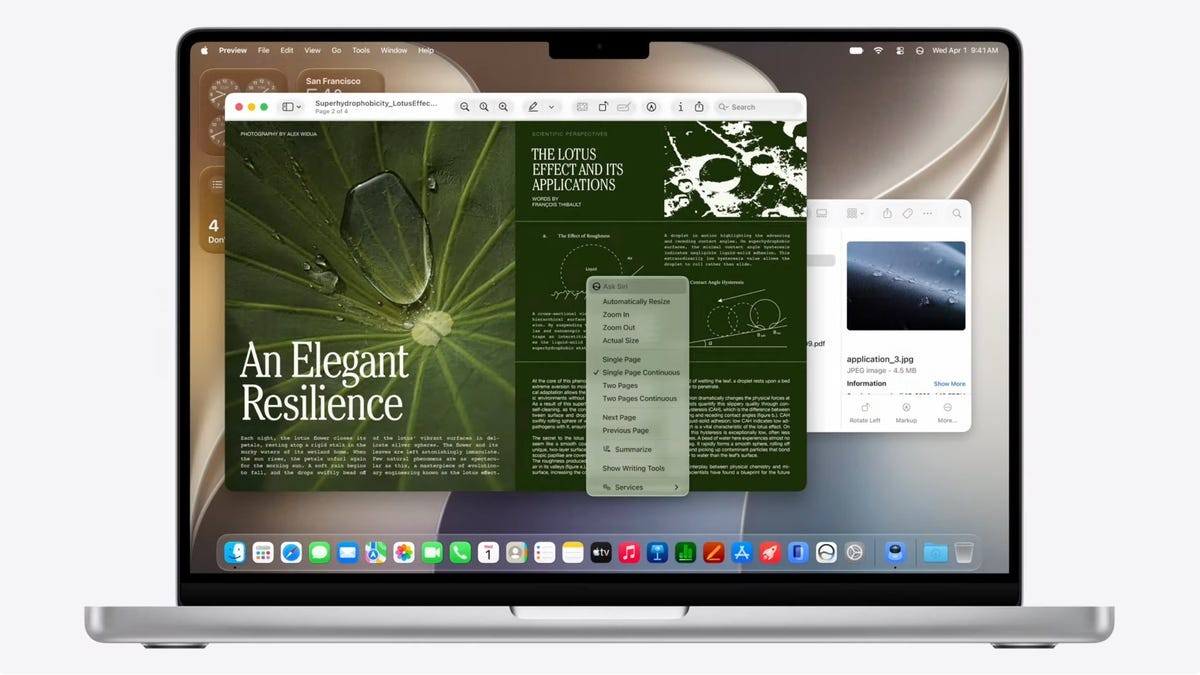
Liquid Glass is still here. Good riddance some might say but this time the changes are subtle. Tighter corners on windows. Faster animations. Apple says it feels snappier. Search got rebuilt. Spotlight. Photos. Mail. You find things faster now.
Then there’s Siri.
It’s not just an assistant anymore. It sees your screen. Visual Intelligence feeds it context. It can act in apps. You can “Ask Siri” right from Spotlight. There’s a standalone app for it too. Talk to Siri on Mac, then pick up the thread on iPad. It’s all connected.
One catch.
English only to start. Languages later. Typical.
Control your chaos with the new transparency slider. Find your sweet spot.
The design isn’t changing drastically but the tools do. A slider for Liquid Glass effects lets you tone down the see-through look if it gives you a headache. Toolbars are more uniform. Harder to miss labels. Sidebars now stretch to the window edge. Colors stay consistent. You know which window is active. App icons got some extra layers of glass too. Sharper. More defined.
Keep the kids out
MacBook Neo exists now. Cheap laptops for teenagers. Apple added safety rails for it.
“Ask to Browse” stops kids from wandering into bad spots online. They tap a new site the parent gets a text. Permission required. No sneaking off.
Communication Safety got bigger too. It used to just block nudity. Now it blocks violent images and videos too. In Messages. FaceTime. Everywhere.
Parents can set schedules. Hard limits on games or social media across app categories. A bit more control in the chaos of a kid’s day.
Touch?
Look at the bottom of the spec sheet.
It says “Swipe down to refresh.”
There’s an icon of a finger touching glass. Why mention a swipe gesture on a system designed for mice? Unless the hardware changes. Rumors say OLED touchscreens for the Pro lineup. Maybe sooner than next year. If Golden Gate adds iPhone-style refresh gestures maybe the touchscreen Mac is coming fast. Scott Stein’s dream might finally come true. Convergence.
Or maybe it’s nothing. Probably nothing.
The hardware cut-off
If you have an M1 chip or newer you’re in. Including that new MacBook Neo. Golden Gate loves Silicon.
Intel machines are out.
Not all of them. But many.
If your Intel Mac can still run Tahoe (macOS 26) these won’t make the jump to 27:
– 13-inch MacBook Pro from 2020
– 16-inch MacBook Pro from 2019
– 27-inch iMac from 2020
– Mac Pro from 2019
Don’t panic. Security updates last three more years on Intel. You aren’t unprotected today. But new features? Gone.
There is one final blow for the old guard.
Rosetta 2 support ends with this update. Not next year. Now. macOS Golden Gate is the last stop for x86 translation. If you still run old Intel apps you better compile new ones soon.
The developer beta is live. Public beta hits in July. September for everyone else.