
Network bandwidth monitoring used to be a guessing game. You hoped the pipes weren’t clogged. You prayed the security team wasn’t missing something. Then came NetFlow Traffic Analyzer by SolarWinds. It stopped being just a Cisco tool. Now it handles sFlow, J-Flow, and IPFIX too. That versatility is why admins rely on it for enterprise networks, public sectors, and education. It doesn’t just watch traffic. It dissects it.
Deep Dive into Traffic Analysis Capabilities
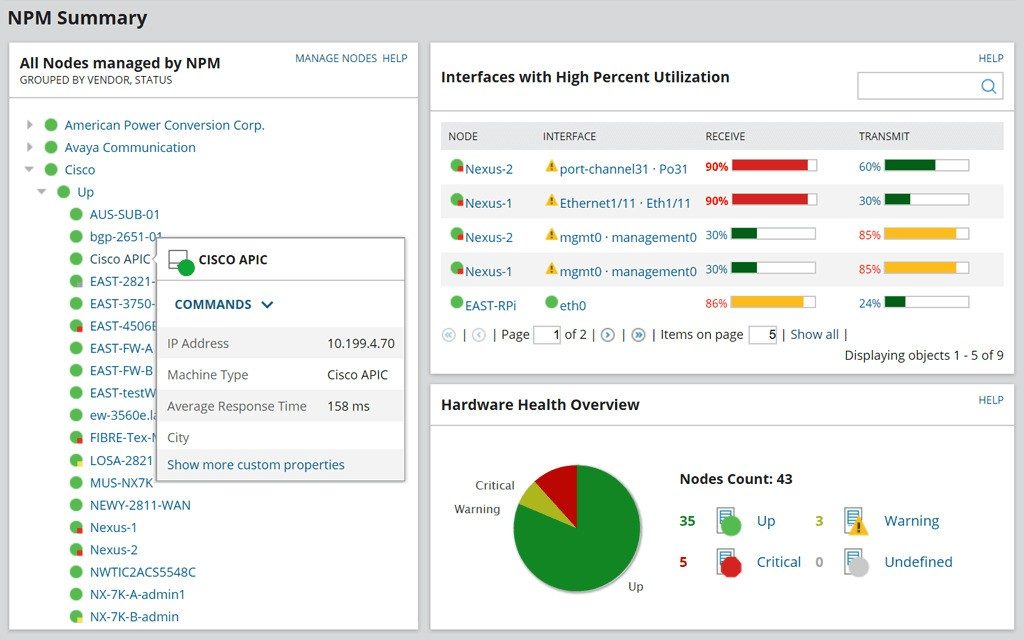
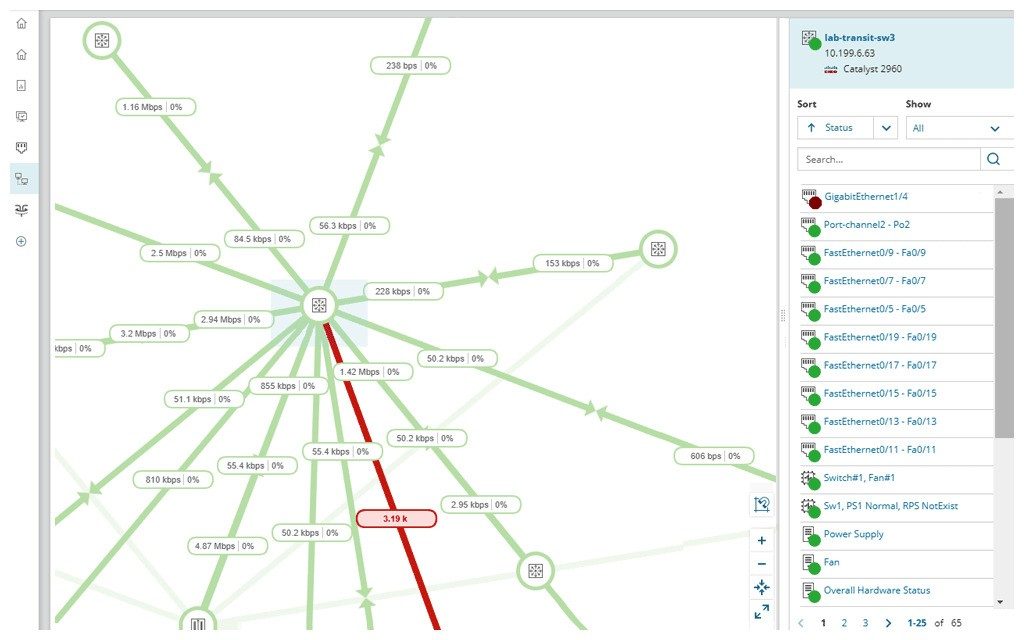
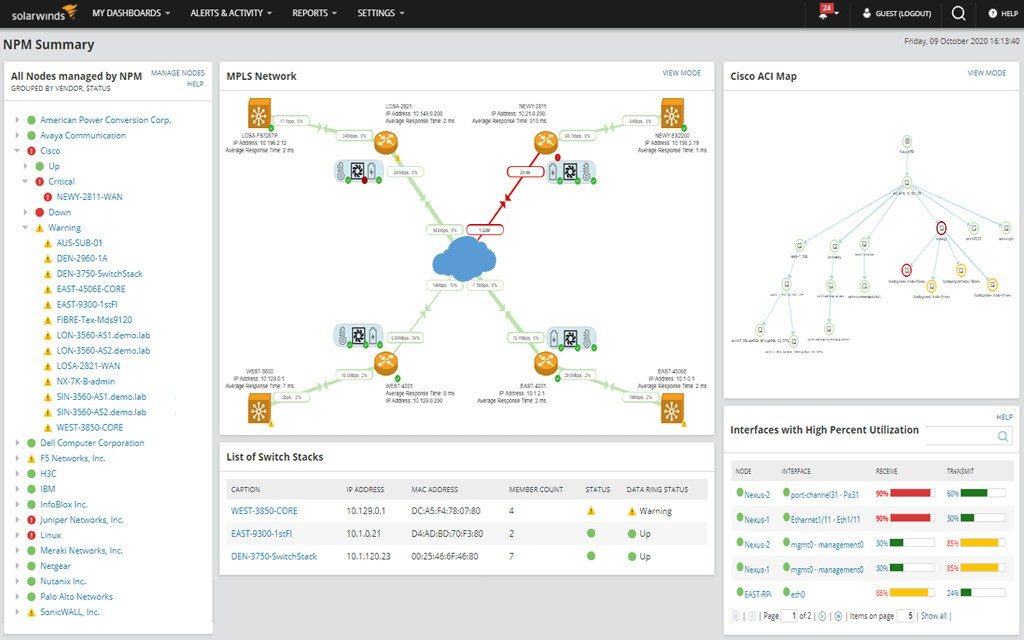
The software sits at the center of proactive network governance. Administrators get real-time visibility into critical interfaces. They see exactly what’s moving. The analysis engine breaks flows down by source, destination, service class, and application type. This granularity matters. It allows teams to predict congestion before it crashes the system. It flags abnormal usage. It spots potential security gaps that simple firewalls might miss.
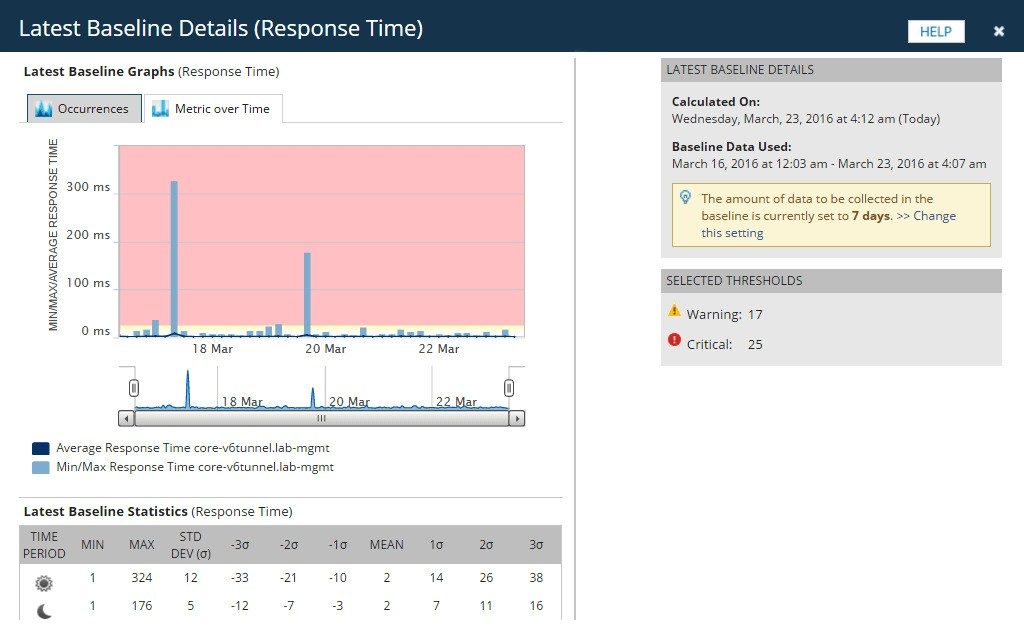
The dashboard is intuitive. That’s not marketing fluff. The dynamic graphs and historical reports make comparing load over time straightforward. You can spot consumption trends. You make decisions about capacity and prioritization based on hard data. Reporting capabilities are advanced. They pair with a customizable alert system. This maintains quality of service. Whether you need a one-time analysis or constant monitoring of app flows, the tool enables efficient resource management.
It supports SNMP versions 1, 2c, and 3 alongside native Cisco NetFlow. This expands its reach into heterogeneous network environments. Integration is smoother across complex existing architectures. You get precise metrics from all managed peripherals. The scope is broad. The insights are specific.
Download, Installation, and OS Compatibility
The goal is immediate visibility. Identify congestion sources. Catch abnormal usage. Improve performance. Plan capacity. The path starts with downloading from SolarWinds. This ensures access to secure updates and support. The process is designed for all user profiles. It’s not locked away behind enterprise-only gateways for basic installation.
Once you have the file, the guided setup takes over. It takes a few steps to reach optimal configuration. You can customize parameters based on your deployment context. Detailed documentation walks you through everything. From choosing interfaces to setting up alert notifications, you’re covered.
Compatibility is strictly Windows-centric. The current official list includes Windows 7, 8, 8.1, 10, and 11. This wide opening lets professionals and IT enthusiasts integrate the tool without friction. It works on individual workstations and larger network architectures alike.
There is no native version for macOS, Linux, or mobile platforms like Android or iOS. Advanced users sometimes use virtualization to run it elsewhere. But official support remains centered on Windows. If you need it on a Mac, you’re on your own or looking for workarounds.
Updates are handled via an integrated module. It automatically signals when new versions are available. You can choose manual direct updates. Or you can schedule them during low-impact windows to minimize supervision disruption. This flexibility in lifecycle management ensures service continuity. It also protects against recently identified vulnerabilities. The cycle keeps your network safe and running.
Does the lack of native Linux support limit its appeal? For some infrastructure setups, it definitely narrows the field. But for the vast majority of Windows-based corporate environments, it remains the gold standard for traffic analysis. The trade-off between platform restriction and feature depth is a calculation many admins are willing to make. The data it provides is too valuable to ignore.
Most small-to-mid-sized businesses don’t realize they are flying blind until bandwidth collapses. That’s where NetFlow Traffic Analyzer license structures come in. They aren’t just price tags. They’re entry points into seeing what’s actually moving through your cables and Wi-Fi.
The vendor offers a trial period. Usually thirty days. It’s not a crippled version. You get full access to the feature set. This matters. You need to stress-test the tool against your actual network topology before signing any contracts. Does it flag the slow database queries? Does it catch the rogue device scanning your ports? The trial answers that.
Pricing Tiers and Licensing Flexibility
There is no truly free tier for unlimited use. If you see claims otherwise, they’re likely referring to educational discounts or partner promotions. The real money talks in node counts and traffic volume.
Here is how the paid versions generally break down:
- Node-based licensing : You pay per device being monitored. Good for sparse networks.
- Traffic volume limits : Better for high-throughput environments where node count is high but individual traffic is low.
- Support levels : Basic email support vs. proactive engineering intervention.
“Consult the official vendor site for a tailored quote. Your infrastructure dictates your price.”
Students and educators often qualify for reductions. You’ll need proof of status. It’s a standard waiver, but it saves cash.
Updates are part of the deal. License holders get major version upgrades and security patches for the contract’s lifespan. You can also request older builds from support if legacy hardware refuses to play nice with the latest JSON parsers or API endpoints. Stick to the latest stable release though. Security holes in outdated analyzers are low-hanging fruit for attackers.
Daily Operations and Support Infrastructure
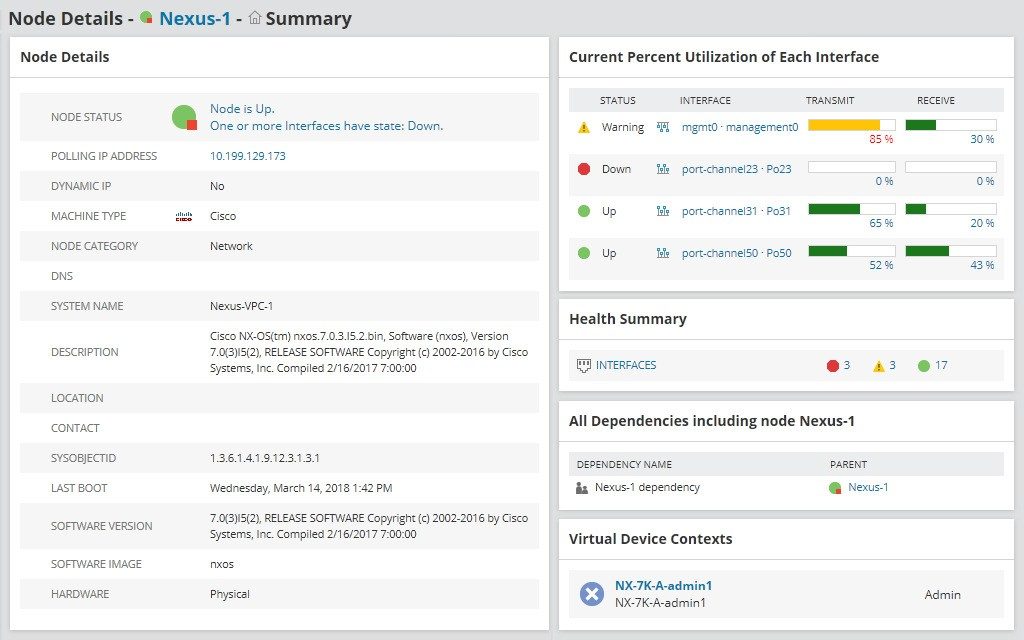
Admins use this tool to find the bottleneck before the CEO complains. It maps flow data. Interactive charts show which application is hogging the pipe. Is it video conferencing? Or is it a backup job running during peak hours? The filters make it intuitive. You don’t need a PhD in packet analysis to read the heat maps.
The vendor doesn’t just dump software and walk away.
- Documentation : Comprehensive manuals and FAQs.
- Customer service : Reactive support for installation hiccups or incident resolution.
- Certified training : In-person or remote courses cover advanced configuration, custom alerting, and third-party integrations.
These courses align with industry best practices. They teach you how to normalize data from multiple vendors into a single view. That’s crucial for hybrid cloud environments.
Future-Proofing and AI Integration
Network management is shifting from reactive to proactive. The vendor is investing heavily here. Expect better protocol support. Faster algorithms for processing massive datasets.
Artificial intelligence is the big push. Machine learning models will detect behavioral anomalies before they become outages. Think unusual login times, strange data exfiltration patterns, or DDoS precursors. The tool won’t just report; it will predict.
This isn’t vaporware. It’s a strategic pivot. Digital transformation demands tools that evolve with the threat landscape.
Downloading this software allows you to centralize traffic monitoring. You gain visibility into resource usage. You ensure stable operations. And you align with modern security expectations.
The question isn’t whether you can afford the license. It’s whether you can afford the downtime.
System Requirements for SolarWinds NetFlow Traffic Analyzer
Before you even think about installing the analyzer, check your hardware. Don’t skip this. You need to know if your current setup can handle the load. This isn’t just about downloading a file. It’s about preparing your infrastructure to actually survive the data flood.
The tool is called NetFlow Traffic Analyzer. It’s built by SolarWinds. If you’ve been in IT for a while, that name carries weight. But weight also means resource consumption. You aren’t just installing a lightweight utility here. You are bringing in a heavy-duty traffic monitoring engine.
Compatibility and OS Support
The software doesn’t care much about Linux right now. It lives on Windows.
Specifically, it supports:
– Windows 11
– Windows 10
– Windows 8 and 8.1
– Windows 7 (both 32-bit and 64-bit)
Yes, Windows 7. It’s an old beast, but the software still lists it. If you’re running a legacy lab or a stubborn SME environment stuck on an older OS, it might work. But don’t expect modern performance gains. The architecture supports both x86 and x64. Pick the one that matches your processor.
Protocol Support: How It Sees Your Network
This is where the “NetFlow” in the name matters. The tool is designed to ingest traffic data. It speaks several languages.
It handles:
– NetFlow v5 and v9 : The classic and the flexible version.
– IPFIX : The IETF standard. Good for interoperability.
– sFlow : Sample-based flow. Faster, less precise.
– J-Flow : Juniper’s proprietary format.
If your network equipment doesn’t support any of these, the analyzer is blind. You need devices that export these streams. Routers, switches, firewalls. They all need to talk to the Windows host running the analyzer.
It also manages devices using SNMP. Versions 1, 2c, and 3 are supported. SNMP v3 is the one you actually want for security. Version 1 and 2c send community strings in plain text. If you’re reading this in a secure enterprise environment, use v3.
Minimum Configuration Needs
You need a Windows machine. It needs administrator rights. Don’t try to run this as a standard user. The installer and the service will fight you.
It needs network access to the equipment exporting the flows. This sounds obvious, but people forget to open ports. UDP 9996 is the default for NetFlow, but check your vendor docs.
Disk space is the hidden killer. The software stores historical data. Metrics pile up. If you don’t allocate enough space for retention, the database will choke. Or worse, it will stop recording. You need to size this for your retention policy. How far back do you need to go? 30 days? 90 days? A year? The disk requirement scales with that answer.
Installation and Licensing
It’s commercial software. There is a free trial. Limited. It’s a trial to see if it fits, not a permanent solution for a growing company.
Internet connection is recommended. Not strictly required for the core analysis, but vital for activation. You also need it for updates. SolarWinds pushes patches. You want those patches. Security vulnerabilities don’t wait.
The interface is in English. Documentation might be available in other languages, but the UI? English. If that’s a barrier, factor in the
The Security Gap No One Is Talking About
Most users think their data is safe because they have a strong password. It’s not enough. The real threat isn’t the lock on the door. It’s the person with a copy of the key. Multi-factor authentication (MFA) has become the industry standard for a reason. It adds a layer of friction that attackers hate. But friction is annoying. Users will skip it if given the chance. Or worse, they’ll find a way around it.
This is where the problem starts.
Why Phishing Still Wins
Phishing attacks have evolved. They used to be obvious scams. Now they are personalized. Deepfakes make it easier. Voice cloning makes it scarier. But the core mechanic hasn’t changed. The attacker still needs you to hand over the second factor.
SMS-based two-factor authentication (2FA) is the weakest link. It relies on the cellular network. And the cellular network is vulnerable to SIM swapping. An attacker calls your carrier. Pretends to be you. Gets your number transferred to their device. Now they get your texts. Your codes. Your access.
This happens more often than you think.
The Rise of App-Based and Hardware Keys
Smartphone authenticator apps are better. They generate codes offline. No SIM swap can intercept them. Apps like Google Authenticator or Authy are common. But they have their own risks. If your phone is stolen or compromised, the codes are gone. Or worse, in the hands of someone else.
Then there are hardware security keys. FIDO2 standards. They plug into USB ports or connect via NFC. They are phishing-resistant by design. The browser verifies the site’s origin before the key signs the request. You can’t be tricked into giving the key to a fake site. It simply won’t work.
These keys are expensive. They are inconvenient. You might lose one. You can’t use them from a borrowed computer. This creates a gap. A gap that enterprises need to fill.
Enterprise Identity Management
For businesses, the cost of a breach is existential. They don’t have the luxury of relying on user behavior. They need strict controls. Identity and Access Management (IAM) systems are the backbone here. They manage who gets in. When. And for how long.
But IAM is complex. It often requires integration with legacy systems. Older applications don’t support modern standards. They might only support basic login forms. This forces a compromise. Companies might stick with weak MFA to keep old software running. Or they might build brittle bridges that break under pressure.
Zero Trust Architecture
The new model is Zero Trust. It assumes breach. It verifies every request. Every device. Every user. It doesn’t care if you are inside the corporate network or on a coffee shop Wi-Fi. The access controls follow you.
This requires a shift in mindset. It’s not just about technology. It’s about policy. It’s about continuous monitoring. If a user’s behavior changes suddenly. If they log in from a new country. The system blocks them. Not because the password is wrong. But because the context is wrong.
The Human Factor
Technology can only do so much. The human element remains the biggest variable. Training helps. But users are tired. They want convenience. They will click the link. They will reuse the password. They will ignore