


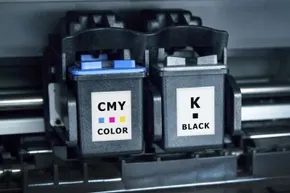
Ink cartridges are absurdly overpriced. Some models have you paying over $100 just to keep the machine running. This makes no sense when the printer itself may have cost less than $90. You find yourself in trouble. You want to get the most out of every drop of ink, but you need to understand how the printer knows the tank is empty.
Manufacturers do not leave this to chance. They program printers to stop printing when the fill level drops critically. It’s a safety measure. If the cartridge is completely dry, the print head may overheat. Plastic parts may melt or crack. You will completely destroy the printer instead of losing ink.
The math is breathtaking. One ounce of ink costs between $13 and $75. Perform the conversion. That’s about $10,000 per gallon.
This pricing strategy is intentional. Companies sell equipment at a loss or with a small margin. They get their profits from consumables. It’s a classic razor blade business model. Since ink is their primary source of income, they have a strong incentive to replace cartridges early. If you swap in a new cartridge while the old one still has usable ink, the manufacturer wins. You lose money.
But are they lying to you? Not exactly. The technology is real. It is only designed for protection, not efficiency.
How the sensor works
Most modern inkjet printers use a chip in the cartridge to communicate with the printer. This chip tracks usage. It counts pages. It monitors ink levels. If the level drops below a certain threshold, the chip sends a signal. The printer will then display a low ink warning.
Some systems use optical sensors. The light beam penetrates through the cartridge. The sensor measures the amount of light coming through. Less light means more ink. More light means less ink. The printer uses this information to calculate the remaining volume.
Other printers use weight sensors. The printer weighs the cartridge. The more ink is used, the cartridge gets lighter. The printer compares the current weight with the original weight. The difference gives information about how much ink has been used.
There is no universal standard. Each manufacturer uses its own method. Some are more accurate than others. Some are easier to hack. Some are designed to fail on purpose.
Why the warning is not the end
If your printer says it’s low on ink, it doesn’t mean the cartridge is empty. This means that the cartridge is almost empty. There is usually some ink left. The printer stops printing to avoid damage. You can often ignore this warning. You can continue printing for a while.
Herein lies the controversy. The manufacturers claim that the warning is made for safety reasons. Critics say it’s a tactic to sell more ink. The truth is probably somewhere in between. Safety is a real concern. Profit is also a motive.
You can extend the life of the cartridges. You can print more pages before the warning appears. You can even reuse cartridges that have been declared empty. However, there is a risk of damage to the printer. Otherwise, you risk voiding the warranty.
The choice is yours. Do you trust the warning? Or do you squeeze every last drop out of the cartridge? There is no right answer. Only the consequences.


Not all manufacturers agree on how to tell you that the printer is empty. The technique varies from brand to brand, and understanding the difference can save you from throwing away perfectly good ink.
Epson trusts the hardware. Their cartridges are equipped with an integrated circuit. This little piece of silicon serves two purposes. First, it confirms that you have installed the correct cartridge. Second, every drop delivered is tracked. When the level drops below a certain threshold, the chip sends a signal to your computer. You will receive a notification. The printer effectively decides when you’re out.
Canon does not use chips for detection. They use physics. Inside the printer is an optical sensor that sends light through a prism at the bottom of the ink tank. The beam hits a sensor that determines the liquid level. If the ink falls too deep, the light will be reflected differently. The sensor detects this change. A warning will appear on the screen. You change the cartridge.
Then there are printers where the print head is installed directly in the cartridge. This design protects the printer from clogging, but creates another problem. These cartridges often use chips similar to Epson’s. The catch? Some models refuse to print even if there is still ink left. The system informs you that the cassette is empty. You throw the rest away. It is inherently wasteful.
Do these systems really work?
You should question the accuracy. Journalists and industry insiders report inconsistent returns. The consensus is clear: manufacturers are playing it safe. They prefer to dispose of ink cartridges instead of letting them dry out. The goal is to get you to buy.
One study found that nearly 60 percent of ink goes unused. If you throw it all away, it stays in the cartridge. That’s a lot of wasted pigment.
Don’t waste money on ink
If you’re losing sleep over rising ink prices, do your research before you buy. The model is usually simple. Cheap printers have expensive ink. More expensive printers often have cheaper ink. If you spend more on hardware upfront, you can save on supplies later.
The way you use the printer is also important. Leave it on. Switching the power off and on starts maintenance routines. These cycles clean the nozzles. They can use a large percentage of the volume of a single cartridge. Leaving the printer on avoids this repeated drain.
Print only when needed. Leave the power on. You get more pages from each bottle. Hope this saves you some money.
Why is printer ink so expensive?
It’s not just marketing. Getting the mix right takes time. Pigments and dyes must be balanced. The ink must withstand high temperatures. It should dry quickly without smudging. These restrictions increase the price.


